
Use cases · Community
A campaign for a date
A time-limited campaign with its own budget and charities, for a day or a season.
- Who paysYour company
- Starts withA purchase
- Tax receiptIn your company's name
Needs API access on a validated account. Plans
your-brand.example/earth-day
Step by step
Click through the site. Each step shows what your customer does, what your server sends and what Charitips answers.
1Order paid
To comeYour customer does…
Clicks “Buy now, 35,00 €”.
Your server sends…
Creates a 5 € donation for order #2204 on the campaign “Earth Day”.
POSTcreate-donation
Charitips answers…
Charitips records the donation and returns its id: it waits for your customer to pick a charity.
Charitips will then tell your server the donation was created.
2Charity chosen
To comeYour customer does…
Clicks “Give 5 € to the charity”.
Your server sends…
Assigns that donation to the charity your customer picks.
POSTclaim-donation
Charitips answers…
The donation now goes to the charity your customer picks.
Charitips will then tell your server the donation was updated.
3Impact page
To comeYour customer does…
Clicks “See where Earth Day goes”.
Your server sends…
Reads the campaign's totals.
Charitips answers…
Charitips returns the total given, the number of donations and the most chosen charities.
How to read this demo: the site shows what your customer does, and the panel what your server sends and what Charitips answers, step by step.
The site is made up and nothing is sent. The endpoints, fields and webhook events are the real ones, and so are the charities.
This demo is one example. Earth Day budget spent on orders: that is the case the demo plays. The same flow also covers:
One flow, 4 variants
Each card is this flow in another sector or use case. Pick one: the demo above plays it, with its site, its amounts and its charities. The API calls stay the same.
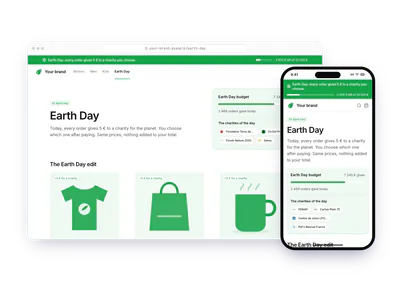
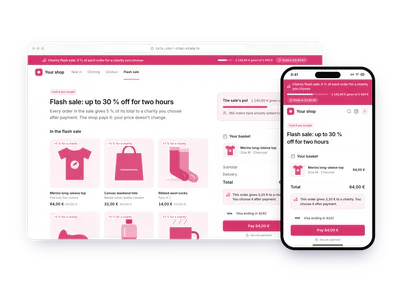
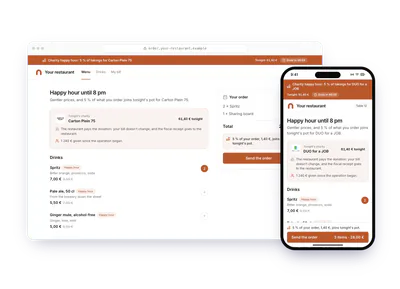
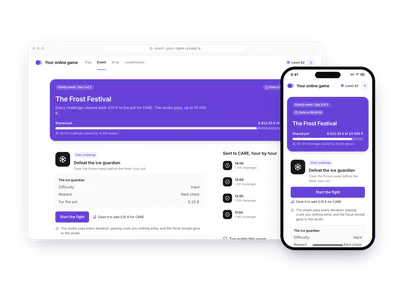
Build it
The calls behind the demo, in order. Each step shows the request your server sends.
donation_createdonation_updateBefore you start
- A
TIME_BASED,FIXED_AMOUNTcampaign with an end date and a budget, billed when it is activated.
Pick the charities of the date
Put the charities of the date in a charities selection, as in step 3 of Your first donation. See Charities and selections.
POST /v1/charities-selectionscurl -X POST https://api.sandbox.charitips.com/v1/charities-selections \ -H "Authorization: Bearer $CHARITIPS_TOKEN" \ -H "Content-Type: application/json" \ -d '{ "name": "Earth Day", "charityIds": [ "<charityId>", "<charityId>" ] }'Built from the spec and the API codeRequest bodies are written for this docs and checked against the API's validation; ids in angle brackets are placeholders. Response values are placeholders built from the schema.
Create the campaign
Create one campaign per date:
TIME_BASEDwith anendDate, andFIXED_AMOUNTwith abudgetin cents.endDateis read as midnight UTC, so pass the day after the date:2027-04-23keeps Earth Day open until its end.POST /v1/campaignscurl -X POST https://api.sandbox.charitips.com/v1/campaigns \ -H "Authorization: Bearer $CHARITIPS_TOKEN" \ -H "Content-Type: application/json" \ -d '{ "name": "Earth Day", "charitiesSelectionId": "<charitiesSelectionId>", "type": "TIME_BASED", "endDate": "2027-04-23", "amountType": "FIXED_AMOUNT", "budget": 1000000 }'Built from the spec and the API codeRequest bodies are written for this docs and checked against the API's validation; ids in angle brackets are placeholders. Response values are placeholders built from the schema.
Activate the campaign
The whole budget is billed when you activate the campaign. By card or direct debit, the campaign starts at once; paid by bank transfer, it stays
PENDINGuntil the transfer arrives, so activate it a few days ahead. An active campaign takes donations at once, before itsstartDatetoo: if you activate ahead of the date, create donations only for orders placed during it. What activation checks is listed in Campaigns.POST /v1/campaigns/<campaignId>/activatecurl -X POST https://api.sandbox.charitips.com/v1/campaigns/<campaignId>/activate \ -H "Authorization: Bearer $CHARITIPS_TOKEN"Built from the spec and the API codeRequest bodies are written for this docs and checked against the API's validation; ids in angle brackets are placeholders. Response values are placeholders built from the schema.
Give with each order
From your payment webhook, for each paid order of the date, create a donation with the set amount and the order id as
uniqueExternalId.POST /v1/donationscurl -X POST https://api.sandbox.charitips.com/v1/donations \ -H "Authorization: Bearer $CHARITIPS_TOKEN" \ -H "Content-Type: application/json" \ -d '{ "campaignId": "<campaignId>", "amount": 500, "uniqueExternalId": "order_2204" }'Built from the spec and the API codeRequest bodies are written for this docs and checked against the API's validation; ids in angle brackets are placeholders. Response values are placeholders built from the schema.
Save the buyer's choice
On the confirmation page, show the charities of the date and save the buyer's choice with Claim a donation. A buyer who does not choose loses nothing: the donation is assigned automatically when the campaign closes.
POST /v1/donations/<donationId>/claimcurl -X POST https://api.sandbox.charitips.com/v1/donations/<donationId>/claim \ -H "Authorization: Bearer $CHARITIPS_TOKEN" \ -H "Content-Type: application/json" \ -d '{ "charityId": "<charityId>" }'Built from the spec and the API codeRequest bodies are written for this docs and checked against the API's validation; ids in angle brackets are placeholders. Response values are placeholders built from the schema.
Show the running total
To show the running total and the share of each charity, read Get campaign metrics on your server (
totalDonation,numberOfDonations,sortedCharities) and cache it for a few minutes.GET /v1/campaigns/<campaignId>/metricscurl -X GET https://api.sandbox.charitips.com/v1/campaigns/<campaignId>/metrics \ -H "Authorization: Bearer $CHARITIPS_TOKEN"Built from the spec and the API codeRequest bodies are written for this docs and checked against the API's validation; ids in angle brackets are placeholders. Response values are placeholders built from the schema.
Close the campaign
Once the end date has passed, a daily scheduled job closes the campaign; on sandbox, close it yourself. You can close it at any time with Close a campaign, and closing cannot be undone. Donations still without a charity and the budget not yet given are then assigned to charities automatically; once the budget is paid, the money goes to the charities and a report is generated. With
fiscalReceiptType: SINGLE_DONATION, your fiscal receipts are issued at that point, one per charity, otherwise they come with the yearly ones (see Billing and fiscal receipts).POST /v1/campaigns/<campaignId>/closecurl -X POST https://api.sandbox.charitips.com/v1/campaigns/<campaignId>/close \ -H "Authorization: Bearer $CHARITIPS_TOKEN"Built from the spec and the API codeRequest bodies are written for this docs and checked against the API's validation; ids in angle brackets are placeholders. Response values are placeholders built from the schema.
Edge cases
- The budget runs out. The next donation answers
400 Insufficient campaign budget.(INSUFFICIENT_CAMPAIGN_BUDGET) and the order goes through without one. The check is per donation: one larger than what is left is refused in full. - An order comes after the end. Once the campaign is closed, creating a donation answers
403 Campaign has ended.; stop asking on your side. - A retried webhook. The same
uniqueExternalIdanswers409instead of giving twice. - An order is cancelled. Once the budget is paid, the donation cannot be deleted (
403 Donation already paid): it stays and counts towards the budget. - No donation at all. The scheduled job leaves a fixed-budget campaign open if it received no donation, or none with a charity. With donations still waiting for a charity, close it yourself; with no donation at all, closing it answers
403 NOTHING_TO_CLOSE: ask us. - A vote instead of orders. For a budget shared by votes of customers or employees, see Customers vote on a budget.
The memo
Send the memo to your team
Already written for this flow
- What it does and who pays, in a few sentences
- What you need: plan, API calls and webhooks
- What you can report: donations, charities, impact and receipts
To paste in an email, a document or a note.
Email it